How to do an AI visibility audit: a step-by-step checklist
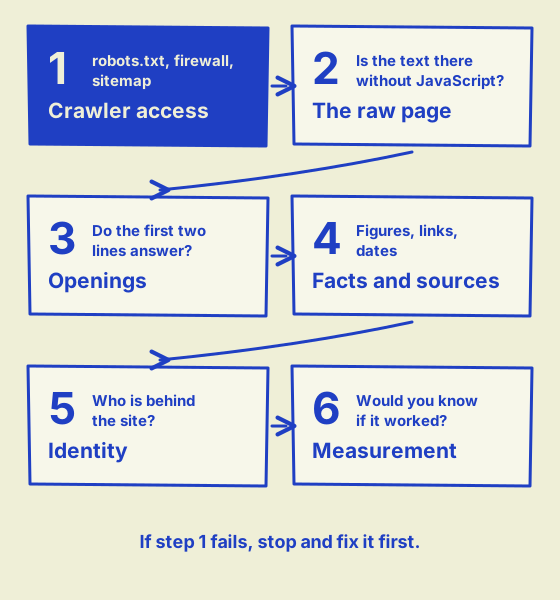
To do an AI visibility audit, you check six things in order: whether AI crawlers can get into your site, whether your text is there without JavaScript, whether your pages answer questions in their opening lines, whether your facts are specific and sourced, whether it is clear who is behind the site, and whether you are measuring any of it. You need a browser, a terminal and free tools from Google and Bing, and most steps take under an hour on a small site. This guide goes through each step, with what to look for and what to do about it, and ends with a checklist template you can download.
Key takeaways
- You can audit a site's AI visibility yourself in six steps: crawler access, the raw page, openings and structure, facts and sources, identity, and measurement.
- Do the steps in that order. If AI search crawlers are blocked, nothing after step 1 matters.
- Test the firewall as well as robots.txt: request a page with an AI crawler's name and compare the result with a normal browser.
- Most of the checks need only a browser, a terminal and free tools from Google and Bing.
- Re-run the access checks after any change to your hosting, CDN or CMS, and the full audit every three months.
What do you need before you start?
Before you start, pick the pages you will test. Auditing every page is slow and rarely changes the findings; a handful of the right ones tells you nearly everything:
- Your home page, about page and contact page.
- The 3 to 5 pages that bring in the most customers, such as your main service or product pages.
- Your 2 or 3 most-read articles or guides, if you publish any.
You also need a way to send a request from the command line. On a Mac or Linux, curl is already installed in Terminal. Windows 10 and 11 include it too: type curl.exe rather than curl, because in PowerShell plain curl runs a different command.
Finally, have your analytics and Google Search Console logins ready for step 6. If you have never read what an AI visibility audit is, that guide explains why each layer matters.
Step 1: Can AI crawlers get into your site?
Step 1 is the one that decides everything else, because a page an AI crawler cannot fetch cannot be quoted. OpenAI is explicit about it: its crawler documentation says sites that opt out of OAI-SearchBot will not appear in ChatGPT search answers.
Read your robots.txt
Open /robots.txt on your domain and read it as a crawler would. Rules are grouped under User-agent lines, and there is one detail that catches people out:
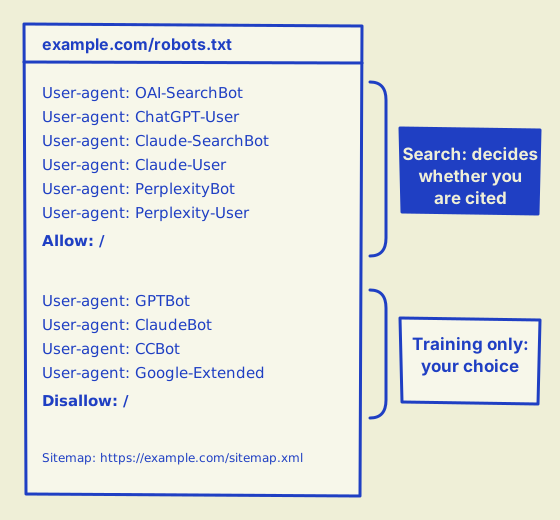
under the robots.txt standard, RFC 9309, a crawler that finds a group with its own name follows that group only and ignores the * group entirely.
So a group that names PerplexityBot to block one folder also cancels every general rule you wrote for all crawlers.
Separate the crawlers that search from the ones that collect training data. Blocking GPTBot, ClaudeBot or CCBot keeps your content out of future training sets; it does not stop ChatGPT, Claude or Perplexity from citing you, provided their search crawlers are allowed.
Test your firewall
robots.txt is a polite request; a firewall is a locked door, and it can be locked even when robots.txt says come in. Test it by asking for your home page twice, once with an AI crawler's name and once as an ordinary browser:
curl -s -o /dev/null -w "%{http_code}\n" -A "Mozilla/5.0 (compatible; OAI-SearchBot/1.0)" https://example.com/
curl -s -o /dev/null -w "%{http_code}\n" -A "Mozilla/5.0 (Macintosh)" https://example.com/
If the browser gets 200 and the crawler gets 403 or 503, something is turning AI crawlers away by name. Repeat with PerplexityBot and Claude-SearchBot.
Treat a block as a strong warning rather than proof: some firewalls let the real crawler through after checking where the request comes from.
Either way, open your CDN or hosting dashboard and read its bot and AI crawler settings, because several now block AI crawlers by default.
Check the sitemap and the page tags
Make sure /sitemap.xml exists, lists your key pages and is named on a Sitemap: line in robots.txt.
Then view the source of each key page and search for noindex, nosnippet and max-snippet. Any of these on a page you want quoted is a problem.
Step 2: Is your text in the raw HTML?
Your text needs to be in the HTML the server sends, because most AI crawlers read that and do not run JavaScript. Google can render scripts, but its own JavaScript guidance recommends server-side rendering or pre-rendering anyway, noting that "not all bots can run JavaScript."
To test a page, open it and choose View Page Source (Ctrl+U on Windows, Option+Command+U on a Mac). Do not use Inspect, which shows the page after scripts have run. Search the source for a sentence from the middle of the page. If you cannot find it, neither can an AI crawler.
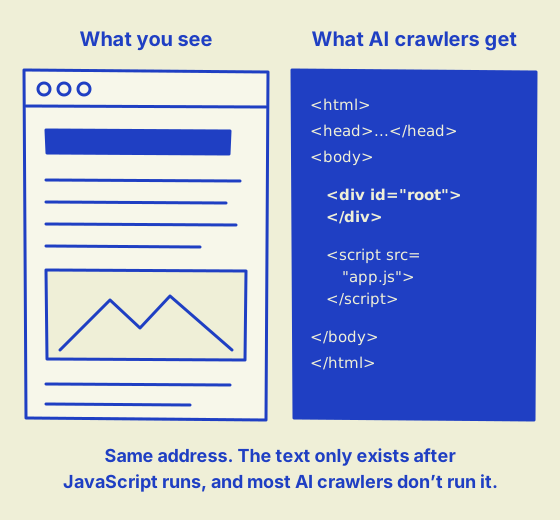
If the text is missing, the fix belongs with whoever built the site: server-side rendering, pre-rendering or static generation, depending on the framework.
While you are in the source, check that each page has a rel="canonical" tag pointing to itself, and that its address loads directly over https without a chain of redirects.
Step 3: Do your pages answer the question in the first two sentences?
Assistants quote passages, so the two sentences under each headline do most of the work. A quick way to judge them: copy the first two sentences from each key page into a blank document, and read them without the rest of the page. Each should answer the headline on its own.
For example, imagine a bakery page headed "Do you make gluten-free cakes?" that opens: "At Rosie's, we believe everyone deserves cake." Nothing there can be quoted. Rewritten: "Yes. We make a gluten-free version of all eight of our celebration cakes, baked in a separate kitchen, with 48 hours' notice." Now an assistant has an answer it can lift and credit.
While you are reading, check that:
- each page has one H1, and the headings below it run in order;
- some H2s are the questions customers actually ask, taken from your inbox, your reviews or your sales calls;
- steps, comparisons and prices are real lists and tables, not images or styled boxes;
- your structured data is valid. Google explains the formats in its introduction to structured data, and the Schema Markup Validator checks any page for free.
Step 4: Are your facts specific, sourced and current?
Take your three most important pages and highlight every claim. For each one, ask whether it has a number, a name or an example, and whether a reader could check where it came from. "We're one of the leading suppliers" fails both tests; "We have supplied 1,200 schools in Victoria since 2014" passes the first. This matters for AI answers in particular: a study published at KDD 2024 found that adding statistics, quotations and citations to content raised its visibility in AI-generated answers by up to 40%.
Then check dates. Articles should show when they were published or updated. Your sitemap's <lastmod> dates should change only when a page really does:
Google says in its sitemap documentation that it uses the value only when it is consistently and verifiably accurate.
A sitemap where every page shows today's date is telling crawlers nothing.
Step 5: Is it clear who is behind the site?
AI systems are more willing to cite a source they can identify. Check that your home page has Organization structured data with your name, address, logo and links to your profiles; that about and contact pages exist and are linked from every page; and that articles name an author who has a page of their own.
Then look for inconsistency, which is surprisingly common. Compare how your business name appears in your page titles, your footer, your structured data, your Google Business Profile and your social accounts. "Smith & Co", "Smith and Co Pty Ltd" and "SmithCo" may be obviously the same to you; to a model they are three possible companies. A useful test is to ask ChatGPT, Claude and Perplexity "What is [your business name]?" and see whether they describe you, someone else, or nothing.
Step 6: Could you tell if it is working?
Set up measurement before you change anything, or you will never know which fix helped. Three things are worth doing:
-
Track AI referrals. In your analytics, create a segment for visits from chatgpt.com, perplexity.ai, claude.ai, gemini.google.com and copilot.microsoft.com.
OpenAI says in its publisher FAQ that ChatGPT adds
utm_source=chatgpt.comto the links it sends, which makes those visits easy to find. - Verify both search consoles. Google counts traffic from AI Overviews and AI Mode within ordinary web search figures in Search Console. Bing matters too, since Copilot uses its index, and you can import a site already verified in Search Console into Bing Webmaster Tools in a few clicks. Bing says traffic data can take up to 48 hours to appear.
- Ask the same questions every month. Write down 10 to 20 questions your customers ask, put them to ChatGPT, Claude, Perplexity and Gemini each month, and note which sites are cited. A spreadsheet is enough.
The AI visibility audit checklist
Here is every check from the six steps in one place. You can also download it as a spreadsheet template (CSV, opens in Excel, Numbers or Google Sheets), with columns for your result and notes.
1. Crawler access
- robots.txt does not block AI search crawlers. Open /robots.txt. Look for groups naming OAI-SearchBot, ChatGPT-User, Claude-SearchBot, Claude-User, PerplexityBot or Perplexity-User, and for a "User-agent: *" group with "Disallow: /".
- Training crawlers are blocked or allowed on purpose. Decide about GPTBot, ClaudeBot, CCBot and Google-Extended. Blocking them does not affect AI search.
- The firewall lets AI crawlers through. Request your home page with curl using an AI crawler's name as the user agent, then without it. A 403, a 503 or a "Just a moment" page means a block.
- An XML sitemap exists and is listed in robots.txt. Open /sitemap.xml and check robots.txt has a "Sitemap:" line.
- Key pages are not marked noindex or nosnippet. View the source of each key page and search for "noindex", "nosnippet" and "max-snippet".
2. The raw page
- Main text is in the HTML before JavaScript runs. View the source of a key page (not Inspect) and search for a sentence from the middle of it.
- Pages respond quickly and without redirect chains. Check each key address returns status 200 directly, over https.
- Each page has a canonical tag pointing to itself. Search the source for rel="canonical".
3. Openings and structure
- One clear H1 per page. Search the source for "<h1". There should be one.
- The first two sentences answer the headline. Read only the first two sentences under each H1. Could they be quoted on their own?
- Some headings are questions customers ask. Compare your H2s with the questions in your inbox and on sales calls.
- Lists and tables are real HTML. Steps, comparisons and prices should be <ol>, <ul> or <table>, not images or styled boxes.
- Structured data is present and valid. Run key pages through the Rich Results Test or the Schema Markup Validator.
4. Facts and sources
- Pages give specific figures, not just descriptions. Count the numbers, measurements and prices on a key page.
- Claims link to their sources. Every statistic should have a link or a named source beside it.
- Articles carry a visible date and a named author. Check the byline and date near the top of each article.
- Sitemap dates change only when pages do. If every <lastmod> in the sitemap is today's date, the dates mean nothing.
5. Identity
- Organization structured data on the home page. Check for "@type": "Organization" with name, url, logo and sameAs.
- About and contact pages exist and are linked. Both should be reachable from every page, usually in the footer.
- The brand name is spelled one way. Compare the name in the title tags, footer, structured data and social profiles.
- Authors have their own pages. Each byline should link to a page about the author, with their background.
- Profiles elsewhere link back. LinkedIn, X, YouTube and similar profiles should link to the site, and the site to them.
6. Measurement
- AI referrals are tracked in analytics. Create a segment for chatgpt.com, perplexity.ai, claude.ai, gemini.google.com and copilot.microsoft.com, and for utm_source=chatgpt.com.
- Google Search Console and Bing Webmaster Tools are verified. Bing can import a site already verified in Search Console.
- A fixed set of questions is checked monthly. Ask ChatGPT, Claude, Perplexity and Gemini the same 10 to 20 questions and note who they cite.
How often should you do an AI visibility audit?
Do the full audit every three months, and the step 1 access checks whenever something changes underneath the site: a new host, a new CDN or firewall setting, a CMS migration or a redesign. Those are the moments crawlers get locked out without anyone noticing. The monthly questions from step 6 tell you in between whether anything has moved.
Is an audit for a brand different from one for a small business?
The steps are the same; the emphasis is not. A small business should spend most of its time on steps 1 to 3, because a single firewall setting or a slow opening paragraph can be the whole problem, and both can be fixed in an afternoon. A larger brand usually passes those and has more to gain from step 5 and from what happens off its own site: reviews, press coverage, Wikipedia and Wikidata entries, and consistency across several domains. Remember that robots.txt applies per host, so each subdomain needs checking on its own.
What if you would rather not do it by hand?
The six steps above take an afternoon for a small site. Our checker runs the same checks automatically, 40 of them across up to 20 pages, in about a minute, and shows the evidence for each result. The score and six checks are free; the full report with every fix costs US$9. Whichever way you do it, start with step 1.